October 6, 2026
Why Page View Counting Still Matters for Modern Websites
By @yt089zih1i
When I started working with websites in the early 2000s, the first thing anyone asked about their site was "how many hits did we get?" Back then, a hit was just a file request, and a single pageview could generate a dozen hits. That gave us a number, but not much insight. Over the years, page view counting has evolved into a far more nuanced practice, and even in an era of real-time analytics and event tracking, it remains a fundamental metric for understanding how content performs.
But counting page views is only useful if you know what you are measuring and why. I have seen teams obsess over raw pageview totals while ignoring everything else, and I have seen others dismiss the number entirely as a vanity metric. Both extremes miss the point. The real value comes from treating page view counting as one piece of a larger analytical puzzle, especially when combined with user engagement data, traffic sources, and conversion rate optimization goals.
What a Pageview Actually Tells You
A pageview, in its simplest form, is a single request for a page on your website. That request can be logged by server-side tracking systems like Apache log files or by client-side methods such as a JavaScript tag embedded in your page. When a visitor loads your homepage, your blog post, or your product page, the server or tracker registers that as one pageview. It sounds straightforward, but there are nuances worth understanding.
For example, a single unique visitor might generate multiple pageviews in one session. They might land on your homepage, click through to an article, then visit your contact page. That sequence gives you three pageviews from one visitor. If you look at pageview counting alone, you see the total volume of content consumed. Combine it with session duration and bounce rate, and you start to understand whether that visitor actually read the article or just bounced after a few seconds.
I once worked with a content site that had a million pageviews per month. The team was thrilled. But when we looked at the average session duration, it was under thirty seconds. People were landing on articles and leaving immediately. The pageview number looked great, but user engagement was terrible. That is when I learned that raw counts can mislead without context.

How Page Views Are Tracked: The Technical Side
There are several ways to count page views, and each method has trade-offs. The most common approach today is using a JavaScript tag, which is what tools like Google Analytics and Adobe Analytics rely on. When a page loads, the JavaScript sends a request to the analytics server, recording that a pageview occurred. This method is easy to implement and works well for most sites.
But JavaScript-based tracking has a blind spot. If a visitor has JavaScript disabled, or if they use ad-blocking software that blocks tracking scripts, the pageview is never recorded. Cookie tracking can help fill some gaps by identifying repeat visitors, but it depends on browsers accepting cookies. Server-side tracking using Apache log files captures every request made to the server, including requests from bots and crawlers. That means you get a higher raw number, but you need to filter out non-human traffic to get accurate counts.
Pixel tracking, often used in email campaigns, works by embedding a tiny transparent image in an email. When the email is opened, the pixel loads and registers a pageview. This method is useful for measuring email engagement, but it can be blocked by email clients that do not load remote images.
Each method has its strengths. For most websites, using a combination of JavaScript-based analytics and server-side logs provides a more complete picture. The key is understanding what each method captures and what it misses.
Why Page View Counting Alone Is Not Enough
If page view counting were the only metric you tracked, you would have a very partial view of your site's performance. You might see that a particular blog post has ten thousand pageviews, but you would not know if those views came from organic search, social media, or referral traffic. You would not know whether those visitors stayed for a minute or for ten minutes. You would not know if they clicked through to another page or left immediately.
That is why analytics dashboards typically pair pageview data with other metrics. Bounce rate tells you the percentage of visitors who left after viewing only one page. Session duration tells you how long they stayed. Traffic sources tell you where they came from. Segmentation lets you break down pageviews by device type, geographic location, or user behavior. Clickstream analysis shows the path visitors took through your site.
For conversion rate optimization, pageview data is especially useful when combined with event tracking. If you have a product page that gets a lot of pageviews but very few add-to-cart events, you know something is off. Maybe the page loads slowly, maybe the call-to-action is unclear, or maybe the product description is unconvincing. Without pageview counting, you would not know that the page was being seen at all.

I remember consulting for an e-commerce client who thought their checkout page was broken because they had almost no purchases. When we looked at the pageviews, we saw that the checkout page was getting plenty of visits. The problem was not visibility, it was usability. The pageview data told us where to look, and the event tracking told us where users were dropping off.
Common Pitfalls in Interpreting Pageview Data
One common mistake is comparing pageview numbers across different measurement tools without accounting for methodological differences. Google Analytics may report a different number than Adobe Analytics for the same site, simply because they filter bot traffic differently or use different definitions of a session. I have seen teams argue over which number is correct, when the real answer is that both are correct within their own frameworks. Consistency matters more than absolute accuracy.
Another pitfall is focusing on pageview totals while ignoring the quality of those views. A single unique visitor who reads three articles and subscribes to your newsletter is worth far more than a hundred visitors who land on one page and never return. If your page view counting is not paired with user engagement metrics, you risk optimizing for the wrong thing.
Also be aware of inflated numbers from internal traffic. If your own team is refreshing the dashboard repeatedly, those pageviews get counted. Setting up filters to exclude internal IP addresses is a simple step that many people forget.
Practical Tips for Using Pageview Data
Here are a few things I have learned from years of working with analytics data:
- Always look at pageview trends over time, not just absolute numbers. A spike on a single day could be a viral post or a bot attack. A steady upward trend is more meaningful.
- Segment your pageview data by traffic source. Organic search visitors may behave differently from social media visitors or referral traffic from other sites. Knowing which sources drive engaged visitors helps you allocate marketing effort wisely.
- Use pageview data to identify your best content. Pages with high pageviews and low bounce rates are your winners. Pages with high pageviews and high bounce rates may need better internal linking or more relevant content.
- Do not ignore pages with low pageviews. Sometimes those are your most valuable pages for a specific audience. A niche FAQ page that gets two hundred pageviews a month might convert at a higher rate than your most popular blog post.
The Role of Real-Time Analytics
Real-time analytics tools add another dimension to page view counting. Instead of waiting for a daily or hourly report, you can see pageviews as they happen. This is particularly useful for monitoring the immediate impact of a new post, a social media share, or a paid campaign. If you launch a promotion and see pageviews spike within minutes, you know the campaign is working. If nothing happens, you can adjust quickly.
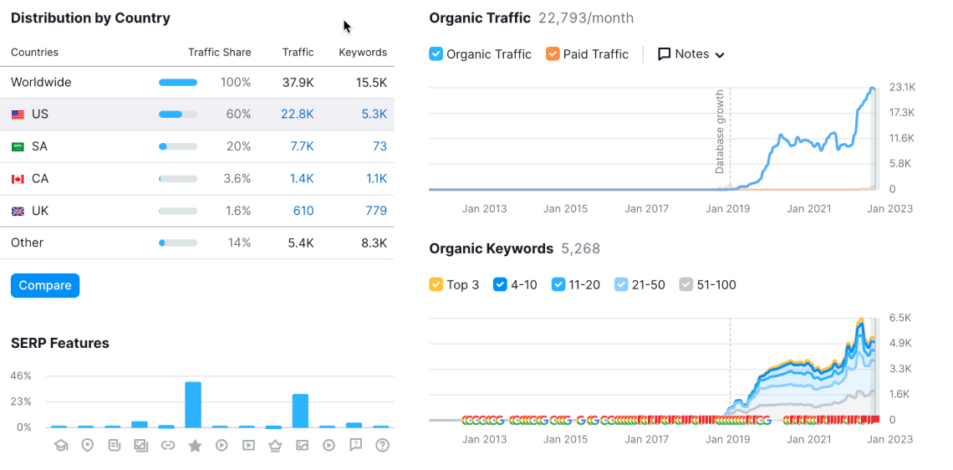
But real-time data can also be distracting. I have seen people refresh their real-time dashboard every few minutes, watching the numbers tick up, without actually doing anything with that information. The value comes from responding to the data, not just watching it.
Putting It All Together
Page view counting is not obsolete, but it is incomplete on its own. The best approach is to treat pageviews as a starting point. Look at the numbers, but always ask what they mean in context. Combine them with session duration, bounce rate, traffic sources, and event tracking. Use segmentation to understand different audience behaviors. And remember that no single metric tells the whole story.
For anyone running a website, whether a small business site or a large content platform, mastering page view counting means learning to ask better questions. Not just "how many people came?" but "what did they do when they got here?" and "how can we make that experience better?" That shift in thinking is what turns raw data into real insight.
❧